
Hi,
I am trying out SculptOS and I was trying to follow along with the first part of this article: https://genodians.org/jschlatow/2022-10-27-fresh-vm-on-sculpt.
I could not find `vm_fs` so I just saved the debian archive into ramfs.
I then tried the vbox6 archive from the Genodelabs, however the logs indicated an error. I then tried with cnuke's vbox6 archive. I do not see an error in the logs, however the virtual machine is still not starting in my wm component. There do seem to be some warnings regarding bogus values for '/shared' and '//machin...' (see screenshot).
Does this issue have something to do with the file-system configuration, or perhaps the vbox6 component is running out of RAM? Regarding the RAM, the component says it is using 4.059 GiB / 4.199 GiB, so I don't think I am running out.
I am stuck on how I can debug this issue, as it seems I am not able to scroll up in the Log window.
Best, Rumen
P.S. When configuring the vbox6 component I tried setting the file-system to the following (none worked): - ramfs - recallfs - used file system - ramfs/recall/debian-<debian-version> - ramfs/recall/debian-<debian-version>/vm

Hello Rumen,
I am trying out SculptOS and I was trying to follow along with the first part of this article: https://genodians.org/jschlatow/2022-10-27-fresh-vm-on-sculpt.
I could not find `vm_fs` so I just saved the debian archive into ramfs.
[…]
This post is outdated in some regards. The basic steps to set up a VM from scratch using my Debian pkg are as follows:
❶ “Use” your persistent storage (as the RAM file-system might not be able to accommodate the .vdi after installation as it has a limited maximum size) ❷ Install the 'cnuke → Virtual machines → Debian-13.3.0' pkg (I've updated the pkg to the latest Debian version) ❸ When deploying the Debian pkg select 'recall fs' for 'File system (vm)' ❹ Install any vbox6 pkg ❺ When deploying the vbox6 pkg select the 'vm' directory in the debian directory for 'File system (vm)' manually via the dialog (see [1]). (The 'shared' directory is also manually selected but probably needs to be created beforehand, for example by using the inspect-window or system_shell.)
[1] https://genode.discourse.group/t/sculpt-25-10-release-candidates/220/11
That being said, Alex (alex-ab) as well as Johannes (jschlatow) provide some pre-configured VMs that are simpler to deploy and might warrant a look also.
Best regards Josef
Thanks, Josef!
I tried the suggested steps, however I still get "FATAL: No bootable medium found!" when starting vbox6. I used the persistent storage and saved the debian archive to "/ahci-1/recall/debian-13.3.0". I configured the vbox6 instance to use "/ahci-1/recall/debian-13.3.0/vm" and I checked that machine.vbox6 and machine.vdi exist in that directory. The logs are identical to the ones from my previous email.
Reading through the thread that you linked, I could not find any iso file in my "/ahci-1/recall/debian-13.3.0/vm". Could this perhaps be the issue?
I tried running the tinycore instance and that works fine.
Best, Rumen
________________________________________ From: Josef Söntgen via users users@lists.genode.org Sent: Tuesday, February 10, 2026 3:42 PM To: Genode users mailing list Cc: Josef Söntgen Subject: Re: Trouble Running Vbox on SculptOS
CAUTION: This email originated from outside the organization. Do not click links or open attachments unless you recognize the sender and know the content is safe.
Hello Rumen,
I am trying out SculptOS and I was trying to follow along with the first part of this article: https://genodians.org/jschlatow/2022-10-27-fresh-vm-on-sculpt.
I could not find `vm_fs` so I just saved the debian archive into ramfs.
[…]
This post is outdated in some regards. The basic steps to set up a VM from scratch using my Debian pkg are as follows:
❶ “Use” your persistent storage (as the RAM file-system might not be able to accommodate the .vdi after installation as it has a limited maximum size) ❷ Install the 'cnuke → Virtual machines → Debian-13.3.0' pkg (I've updated the pkg to the latest Debian version) ❸ When deploying the Debian pkg select 'recall fs' for 'File system (vm)' ❹ Install any vbox6 pkg ❺ When deploying the vbox6 pkg select the 'vm' directory in the debian directory for 'File system (vm)' manually via the dialog (see [1]). (The 'shared' directory is also manually selected but probably needs to be created beforehand, for example by using the inspect-window or system_shell.)
[1] https://genode.discourse.group/t/sculpt-25-10-release-candidates/220/11
That being said, Alex (alex-ab) as well as Johannes (jschlatow) provide some pre-configured VMs that are simpler to deploy and might warrant a look also.
Best regards Josef
-- Josef Söntgen Genode Labs
I tried the suggested steps, however I still get "FATAL: No bootable medium found!" when starting vbox6. I used the persistent storage and saved the debian archive to "/ahci-1/recall/debian-13.3.0". I configured the vbox6 instance to use "/ahci-1/recall/debian-13.3.0/vm" and I checked that machine.vbox6 and machine.vdi exist in that directory. The logs are identical to the ones from my previous email.
Reading through the thread that you linked, I could not find any iso file in my "/ahci-1/recall/debian-13.3.0/vm". Could this perhaps be the issue?
Interesting. Indeed, you need an 'installer.iso' that should have been download by the Debian pkg (there is a window logging the 'fetchurl' progress when deploying it). I gave it a test and here it works as expected, so I am at a loss why it does not work on your end.
Well, in any case, you are free to obtain an .iso file by other means, for example by using the falkon browser on Sculpt OS directly or by downloading it on a different machine and copy it is into the 'vm' directory. As long as the filename is 'installer.iso' (as is configured in the 'machine.vbox6' file) it should be picked up.
Best regards, Josef
Obtaining the ISO file got me to the installer. However, immediately after I click install, vbox goes black and the logs say that the VM was stopped.
Any ideas what could be causing the crash? I tried disabling 3D acceleration and expanding my storage but to no avail.
Best, Rumen
________________________________________ From: Josef Söntgen via users users@lists.genode.org Sent: Wednesday, February 11, 2026 2:50 PM To: Genode users mailing list Cc: Josef Söntgen Subject: Re: Trouble Running Vbox on SculptOS
CAUTION: This email originated from outside the organization. Do not click links or open attachments unless you recognize the sender and know the content is safe.
I tried the suggested steps, however I still get "FATAL: No bootable medium found!" when starting vbox6. I used the persistent storage and saved the debian archive to "/ahci-1/recall/debian-13.3.0". I configured the vbox6 instance to use "/ahci-1/recall/debian-13.3.0/vm" and I checked that machine.vbox6 and machine.vdi exist in that directory. The logs are identical to the ones from my previous email.
Reading through the thread that you linked, I could not find any iso file in my "/ahci-1/recall/debian-13.3.0/vm". Could this perhaps be the issue?
Interesting. Indeed, you need an 'installer.iso' that should have been download by the Debian pkg (there is a window logging the 'fetchurl' progress when deploying it). I gave it a test and here it works as expected, so I am at a loss why it does not work on your end.
Well, in any case, you are free to obtain an .iso file by other means, for example by using the falkon browser on Sculpt OS directly or by downloading it on a different machine and copy it is into the 'vm' directory. As long as the filename is 'installer.iso' (as is configured in the 'machine.vbox6' file) it should be picked up.
Best regards, Josef
-- Josef Söntgen Genode Labs
Hello Rumen,
(I followed the steps I outlined in my first e-mail with a fresh file-system on a test-machine using my debian-13.3.0 and vbox6 pkg, where I could install Debian via the graphical installer successfully. That was to make sure, that the pkgs work as intended.)
Obtaining the ISO file got me to the installer. However, immediately after I click install, vbox goes black and the logs say that the VM was stopped.
Any ideas what could be causing the crash? I tried disabling 3D acceleration and expanding my storage but to no avail.
Can you recall, what exactly the log message did denote?
Best regards, Josef
Hi Josef,
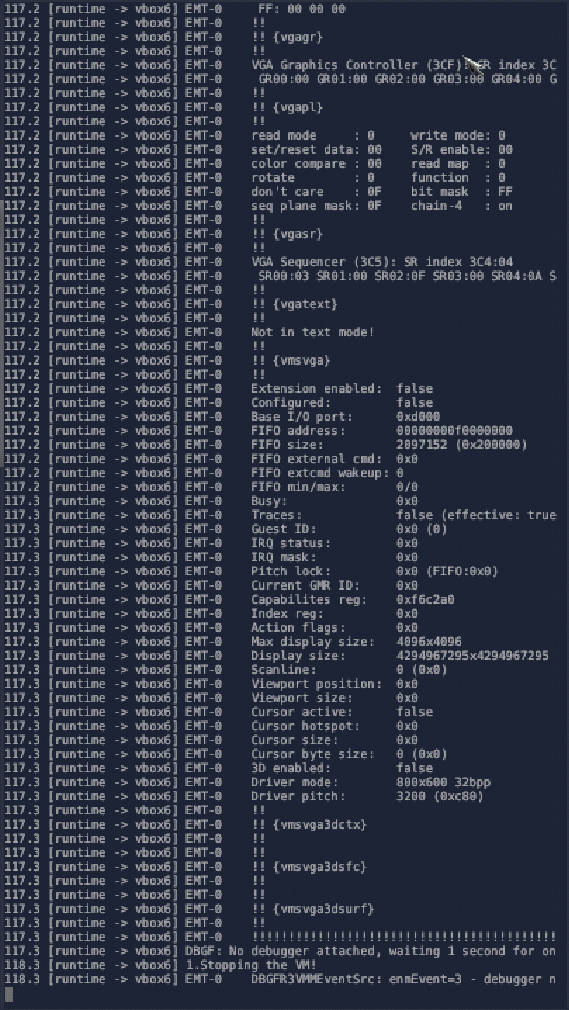
I am attaching a screenshot of the Log, taken right after the VM crashed.
Best, Rumen
________________________________________ From: Josef Söntgen josef.soentgen@genode-labs.com Sent: Monday, February 16, 2026 1:48 PM To: Rumen Mitov Cc: Genode users mailing list Subject: Re: Trouble Running Vbox on SculptOS
CAUTION: This email originated from outside the organization. Do not click links or open attachments unless you recognize the sender and know the content is safe.
Hello Rumen,
I am attaching a screenshot of the Log, taken right after the VM crashed.
Do you use an AMD-based system by any chance?
(While 'vbox6' is broken for some time now on AMD, 'seoul' works fine and is used at least by Alexander's tinycore VMs.)
Best regards, Josef
Yes, that must be it.
Thanks! Rumen
Get Outlook for Androidhttps://aka.ms/AAb9ysg ________________________________ From: Josef Söntgen josef.soentgen@genode-labs.com Sent: Monday, February 16, 2026 3:38:46 PM To: Rumen Mitov Rumen.Mitov@constructor.tech Cc: Genode users mailing list users@lists.genode.org Subject: Re: Trouble Running Vbox on SculptOS
CAUTION: This email originated from outside the organization. Do not click links or open attachments unless you recognize the sender and know the content is safe.
-
 Josef Söntgen
 -
 Rumen Mitov